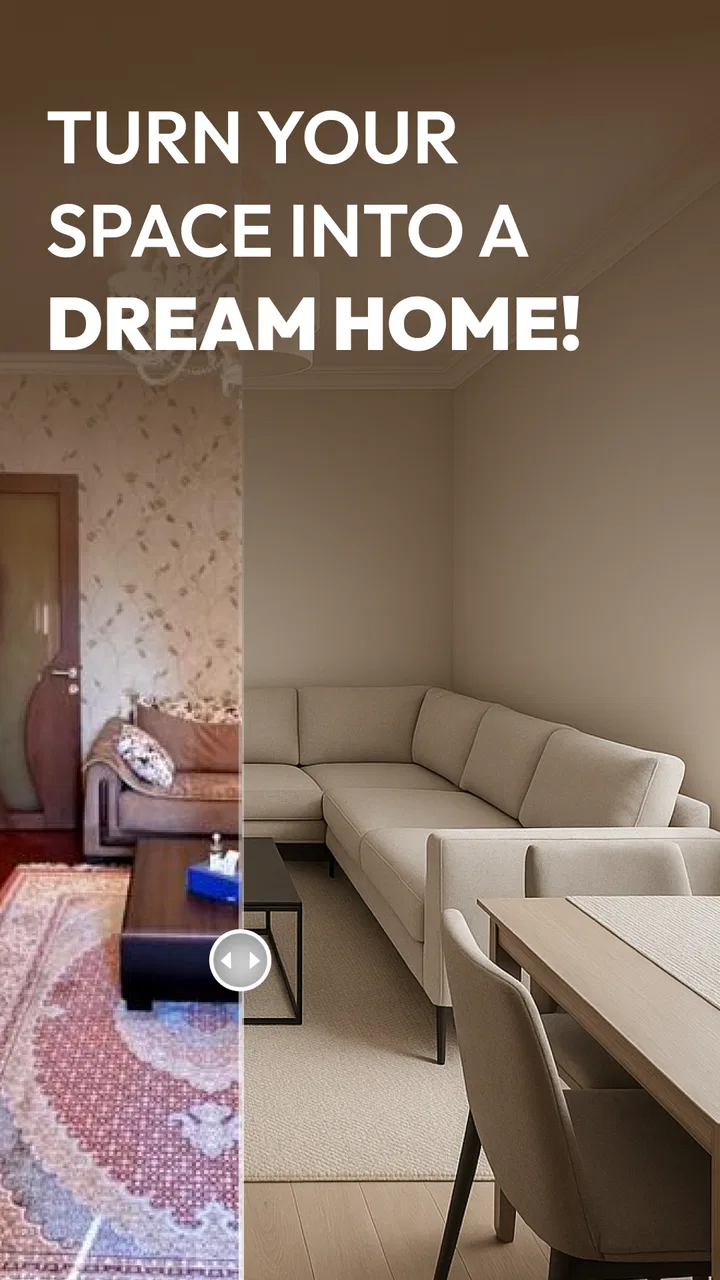
AI Remodel - Interior Design
- 4.6
- Rating
- 5.00M
- Installs
- Free
- Price

 Analysis by App-foxy
I approached AI Remodel - Interior Design as a practical planning tool rather than a replacement for an architect or a full interior-design service. Its main appeal is simple: it lets me explore home renovation ideas with AI before I commit to paint, furniture, or a contractor. That makes it especially interesting for anyone who knows a room feels wrong but cannot yet explain what should change.
This free House & Home app comes from Dmytro Bubela and is aimed at everyday renovation planning. It has built a strong audience, with a 4.5 average from around 41 thousand ratings and over 1 million installs. I can see why it attracts attention: the promise is immediate visual feedback, not a long design lesson. I provide a room or a concept, and the app helps turn that starting point into something easier to discuss.
The important distinction is that the app is most useful during the idea-filtering stage. It can help me compare directions, notice possibilities, and communicate a preference. It is less suitable as the final authority on construction, exact materials, structural changes, or a purchase list. Keeping that boundary in mind makes the experience much more useful and prevents attractive images from becoming expensive assumptions.
You May Also Like

 Blood Strike: 2.5 Anniversary
Blood Strike’s Loadouts Turn Every Drop Into a Tactical Gamble
A close look at Blood Strike’s custom loadouts: how fast access to signature weapons reshapes its battle royale rhythm, rewards preparation, and narrows the gap between fights.

 Pandora - Music & Podcasts
Pandora’s Music Is Easy to Start, but Harder to Recover
Pandora’s strength is its low-effort path from a seed to a station. Its weak spot is how much confidence it asks you to place in connection, setup, and quiet recovery.

 8 Ball Pool
 Is Built on Rivalries, Rematches, and Routine
A close look at the rivalries, rematches, shared routines, and unanswered safety questions that turn a quick pool match into a persistent mobile community.

 Samsung Music
’s Quiet Strength Is Playing What You Already Own
Its reach comes less from spectacle than from dependable access to a personal library. That simplicity is both the app’s strongest retention engine and its ceiling.

 AccuWeather: Weather Radar
AccuWeather Review: A Quick, Clear Forecast for Everyday Decisions
For everyday plans, the best forecast is the one you can understand quickly. AccuWeather makes rain timing, radar, and local conditions easy to act on, with a few trade-offs.

 Hill Climb Racing
Why Hill Climb Racing Still Turns Crashes Into One More Run
A tiny car, a bumpy hill and one more upgrade: Hill Climb Racing keeps resurfacing because its simple chaos makes every near-miss feel personal.
More From Our News Desk
View All News


AI suggestions are most valuable before the renovation begins
The central capability is AI-assisted remodeling. Instead of manually building every wall, cabinet, color, and decorative object from scratch, I can use the app to explore an interior direction more quickly. That matters because early renovation decisions are often vague. Someone may say “I want the room to feel warmer” or “the kitchen looks dated,” but those statements do not yet identify a workable layout or style.
AI visualization gives those vague thoughts a form I can react to. I may discover that I prefer lighter wood rather than darker wood, open shelving rather than more cabinets, or a calmer arrangement rather than a busier decorative scheme. The value is not that every generated result will be perfect. The value is that a visible proposal gives me something concrete to accept, reject, or refine.
I found this more helpful than scrolling through unrelated inspiration photos. A catalog image can look beautiful while being completely wrong for my room. A remodeling concept connected to my own space creates a more relevant comparison. Even when the result is not ready to copy, it can reveal which parts of the current room are causing the problem: color balance, furniture density, lighting mood, or the relationship between storage and open floor space.
There is also a useful psychological benefit. Renovation decisions can become arguments because people imagine different outcomes from the same words. A shared visual concept reduces that gap. It gives a couple, family, landlord, or contractor a common reference point. I would still describe it as a conversation starter, but that is already a meaningful role for a free app.
What the AI approach changes in everyday planning
Traditional interior-planning apps usually reward patience and precision. They can be excellent when I already know the dimensions, understand the interface, and want to position individual objects carefully. The drawback is the amount of work needed before I see anything convincing. AI Remodel takes the opposite route: it favors speed and experimentation over exact manual control.
That trade-off changes how I use it. I would not begin by trying to produce one perfect design. I would create several distinct directions and compare them. For example, a small living room might be tested with a brighter neutral palette, a warmer natural look, and a more dramatic contemporary treatment. The comparison helps me identify a design principle I actually like, instead of becoming attached to the first attractive image.
A useful tip is to change one major idea at a time. If I alter the color, furniture style, floor treatment, and lighting mood in every attempt, I learn very little from the comparison. Keeping most of the concept stable makes the differences easier to judge. This is one of the simplest ways to turn AI output from entertainment into a decision-making tool.
Another practical insight is to judge the image at two levels. First, I ask whether the overall feeling suits the household. Then I inspect whether the proposed arrangement makes sense in daily life. A visually tidy room may not leave enough space for walking, children, pets, storage, or a frequently used chair. The app can help me see a direction, but I have to test that direction against real habits.
Using the app without mistaking inspiration for a plan
In practice, I would start with the room that creates the most uncertainty, not necessarily the largest room. A hallway, bedroom corner, or awkward living-room wall can be a better test than a complete home because the decision is more focused. I would first decide what I am trying to improve: a dated color scheme, poor visual balance, a lack of warmth, or an unclear furniture arrangement.
Once I have that goal, I would compare the generated concepts by asking specific questions. Does the room still look usable? Is the main walkway believable? Does the storage idea fit the amount of equipment the household owns? Would the suggested mood work in both daylight and evening? These questions prevent me from choosing an image simply because it looks polished on a phone screen.
The app is also useful for preparing a conversation with a professional. I can use a preferred concept to explain the atmosphere I want, while leaving the technical solution to a designer, builder, or installer. That division of labor is sensible. The app helps with visual communication; a professional must handle measurements, materials, electrical work, plumbing, safety, and local building requirements.
I would keep a small record of the ideas I like, noting what attracted me to each one. This avoids a common problem with visual tools: collecting many appealing images without making progress. If three different concepts all use a similar warm wall color or open arrangement, that repeated element may be the real preference worth carrying into the renovation.
People may also wonder whether the app is suitable for a complete home makeover. It can be useful as a room-by-room brainstorming companion, but I would not expect it alone to maintain a coherent whole-home plan. A consistent renovation needs decisions about flooring transitions, repeated finishes, storage standards, lighting, and budget. I would use the app to explore each space, then create a separate written list of choices that must remain consistent across the home.
A realistic weekend use case
Imagine I am preparing to refresh a living room before buying anything. The sofa is staying, the walls feel dull, and I am unsure whether the problem is the wall color or the furniture arrangement. Instead of immediately ordering paint, I use the app to explore several remodeling directions around the existing room.
One concept may make the space feel calmer through a lighter palette. Another may emphasize contrast and stronger accents. A third may suggest a more decorative arrangement. I compare them not only for appearance but also for how they treat the sofa, the main walking route, and the areas where books, devices, or everyday objects collect.
After that comparison, I might realize that I do not need a complete redesign. Perhaps the strongest lesson is that the room needs less visual clutter and a clearer focal point. That insight can save money. Rather than replacing everything, I can investigate one wall treatment, better storage, or a revised furniture position. This is where the app earns its place: it can reduce uncertainty before spending begins.
For a renter, the same workflow can focus on reversible changes. I would look for ideas involving color, textiles, lighting, furniture placement, and decoration, then separate those from concepts that imply permanent alterations. For a homeowner planning major work, I would use the images to discuss priorities with a professional, not to approve construction details.
The friction behind attractive AI interiors
The biggest limitation is the gap between a convincing visual and a buildable result. AI-generated design can make a room appear more spacious, balanced, or finished than it would be under real constraints. Existing doors, windows, radiators, sockets, ceiling heights, uneven walls, and fixed plumbing all matter. A concept that ignores one of those details may still be useful for mood, but it should not be treated as an accurate renovation drawing.
There is also a risk of overvaluing style. A design can look impressive because it uses a strong visual theme, while quietly failing the practical needs of the household. Families need durable surfaces and accessible storage. People working from home need a comfortable, realistic workstation. Someone with limited space needs circulation more than decorative drama. I always bring the image back to the question, “How would I live here on an ordinary Tuesday?”
The AI approach may also feel less satisfying to users who want exact control over every object. If I already have a precise floor plan and a carefully measured furniture collection, a manual planner or professional design software may be a better fit. Those tools take longer, but they are better suited to exact placement and repeatable specifications.
Another trade-off is that experimentation can encourage endless tweaking. Because generating another idea feels easy, I can spend more time chasing a perfect look than making a decision. I recommend setting a limit: compare a small number of clearly different directions, identify the recurring elements, and move to verification. The app should shorten the path to a decision, not become a new form of indecision.
The free price makes trying it easy, but the app includes in-app purchases ranging from about six dollars to fifty dollars per item. That means I would explore the basic experience first and decide whether the additional value fits my workflow before paying. I would not purchase simply because a generated image looks better; I would pay only if the extra capability genuinely improves the planning process for a real room.
Users may also ask whether it is appropriate for children. Its content rating is Everyone, which makes it broadly accessible from an age-rating perspective. Still, renovation decisions involve money and sometimes safety-sensitive work, so an adult should remain responsible for interpreting the concepts and approving any real-world changes.
Where ordinary alternatives still win
Inspiration boards remain better when I am collecting references from real homes, products, and finished projects. They show genuine materials and often provide a more reliable sense of texture and scale. Their weakness is that they do not automatically adapt those references to my room.
Manual floor-plan tools are stronger when dimensions and placement are the priority. They can help me test whether a sofa blocks a passage or whether a table fits between walls. Their weakness is that they may require more setup before I can judge the atmosphere. AI Remodel is more appealing when the question is “What direction should this room take?” rather than “Will this exact cabinet fit here?”
A professional designer remains the better choice for a complex renovation, especially when walls, plumbing, wiring, accessibility, or structural elements are involved. The app can make that professional conversation clearer, but it cannot replace site knowledge or technical responsibility. I see it as an early-stage companion, not a construction document generator.
Who will get the most from AI Remodel
I think the strongest audience is the person who wants to renovate but feels stuck between too many styles. The app gives that person a low-cost way to move from vague dissatisfaction to a shortlist of visual directions. It is also useful for homeowners who want to communicate with a partner, decorator, or contractor without relying on descriptive language alone.
It suits cautious planners particularly well. Before buying a new sofa or committing to a wall color, I can use the app to challenge my first instinct. That does not guarantee a correct decision, but it encourages comparison before money is spent. The same process can help someone decide whether a full renovation is necessary or whether a smaller change addresses the real issue.
People who should skip it are those looking for precise architectural planning, detailed quantity calculations, or guaranteed product-level accuracy. It is also not the best first choice for someone who already has a measured plan and wants complete manual control. In those cases, a technical planner or professional consultation will provide more dependable results.
The current version is 1.19.0 and runs on Android 7.0 or later, so compatibility is reasonably broad for Android users with older devices. I would still judge the experience on the phone or tablet I intend to use, because visual planning benefits from a larger screen and a comfortable way to compare concepts. A small display can make it harder to notice proportion problems or practical details.
My overall view is favorable, with a clear condition: use the app to ask better questions, not to skip the questions. Its AI remodeling capability is genuinely helpful when I need to explore a room quickly, explain a feeling, or compare several renovation moods before committing. It is less convincing when I need exact measurements, technical certainty, or a final shopping and construction plan.
For a free app in the House & Home category, that is a worthwhile role. I would install AI Remodel - Interior Design before a renovation decision that still feels unclear, especially for a living room, bedroom, or other space where atmosphere matters. I would keep my expectations grounded, test ideas against daily routines, and use the best result as a conversation tool. If I treated it that way, the app would help me spend less time guessing and more time making deliberate choices.
FAQs for AI Remodel - Interior Design
01What is AI Remodel - Interior Design used for?
AI Remodel - Interior Design is an app designed to help users visualize and plan interior design projects. It employs artificial intelligence to generate realistic 3D models of your space, allowing you to experiment with different layouts, colors, and decor styles before making any physical changes.
02How user-friendly is AI Remodel for beginners?
AI Remodel is highly user-friendly, even for those with no prior design experience. The app features an intuitive interface with easy-to-follow tutorials. Users can quickly learn how to upload images of their space, apply design templates, and customize elements to match their vision.
03Can AI Remodel work with any room size or type?
Yes, AI Remodel is versatile and can work with a variety of room sizes and types. Whether you're redesigning a small apartment or a spacious living room, the app's AI algorithms adjust to provide accurate 3D renders and design suggestions tailored to your specific dimensions.
04Does AI Remodel require an internet connection to function?
While some features of AI Remodel can be used offline, an internet connection is essential for accessing the full range of tools and design templates. Online access ensures the app stays updated with the latest design trends and provides seamless integration with cloud storage for your projects.
05Is AI Remodel free to use, or does it require a subscription?
AI Remodel offers a basic version that is free to use, providing essential tools and limited templates. However, for more advanced features, extensive template libraries, and premium design elements, users can opt for a subscription model that offers additional benefits and continuous updates.
Pros
- User-friendly interface for easy navigation.
- Wide range of design templates available.
- Real-time design rendering is fast.
- Option to save and share projects easily.
- Supports both 2D and 3D view modes.
Cons
- Limited customization for advanced users.
- Requires stable internet for full features.
- Occasional lag in older devices.
- In-app purchases can be expensive.
- Limited free features in basic version.

AI Remodel - Interior Design
Gallery